
A modular automation framework and script repository for runtime testing and investigating Android and iOS apps, designed for penetration testers and malware analysts. It lets you plug in modules to bypass protections (like SSL pinning), inspect network/WebView activity, trace API calls, examine memory/crypto, and monitor malware behavior — all from a single coordinated script. It runs on FRIDA under the hood and ships with 90+ reusable modules so tests scale and repeat easily.
System requirements:
- Linux or macOS (limited functionality available on Windows)
- Python 3
- Rooted device or emulator
- adb
- FRIDA server (running on the mobile device)
Installing from github:
- Clone this repository.
- CD into the medusa directory.
- Install dependencies:
# using the system python3/pip
pip3 install -r requirements.txt

# or inside a virtual environment (recommended)
python3 -m venv .venv
source .venv/bin/activate
pip install -r requirements.txt
Or download the latest stable version from here
Using Docker:
A preconfigured Dockerfile is available in the medusa/ directory.
-
Build the image:
docker build -t medusa:latest ./ -
Run the container:
docker run --name medusa --net=host --rm -it medusa:latest -
Enable ADB over TCP/IP on your physical device or emulator:
adb tcpip 5555 -
Connect to the device from inside the container:
root@docker# adb connect <device_ip>:5555
During installation on macOS, you might encounter the following issue:
Readline features including tab completion have been disabled because no supported version of readline was found. To resolve this, install pyreadline3 on Windows or gnureadline on Linux/Mac.
To resolve, install the gnureadline package for Python:
pip install gnureadline
For Python 3.12, use the following command to install gnureadline from a specific commit:
pip install git+https://github.com/ludwigschwardt/python-gnureadline.git@8474e5583d4473f96b42745393c3492e2cb49224
If you're upgrading from an older version of Medusa and encounter database compatibility issues with Mango, please refer to DATABASE_MIGRATIONS.md for migration instructions.
Important: If you have an existing Mango database and receive errors after updating, check the migration guide to update your database schema.
Run the appropriate entry script for each platform:
# Android
python3 medusa.py

# iOS
python3 medusa_ios.py
After start, MEDUSA will enumerate available devices and let you pick one.
Common interactive workflow
# list available commands or get help about a specific command
medusa> help      # or help <command-name>

# list available modules
medusa> show all

# get quick help/details about a module
medusa> info http_communications/ssl-pinning-bypass

# add a module (Tab completes module paths)
medusa> use http_communications/      # press [Tab] to autocomplete

# list installed packages on the device
medusa> list

# instrument a package (by package name)
medusa> run -f com.my.app

# show available devices and select one
medusa> loaddeviceMedusa’s lightweight companion CLI for static prep and automation — manifest parsing, attack-surface enumeration, app tracking, and simple device/proxy automation.
Run python3 mango.py <database-name> to create or load a database for storing Mango’s results.
# show available devices and select one
mango> loaddevice

# pull an app (by package name)
mango> pull com.my.app

# import an app for analysis
mango> import /path/to/apk
For advanced usage and examples, see our wiki. For quick tips and introductory workflows, check the demos below:
- MEDUSA | Android Penetration tool (credits @ByteTheories)
- MEDUSA | Android Malware Analysis 101 (credits @ByteTheories)
- Unpacking Android malware with Medusa (credits @cryptax)
- Unpacking Android APKs with Medusa (credits @LaurieWired)
- #Medusa - Extensible binary instrumentation framework based on #FRIDA for Android applications (credits @AndroidAppSec)
- Memory inspection with Medusa
- Bypassing root detection
You can contribute to this project by:
- Becoming a sponsor
- Creating a medusa module (see how to)
- Making a pull request
- Reporting an error/issue
- Suggesting an improvement
- Making this project more popular by sharing it or giving a star
Stheno is a subproject of Medusa, specifically designed for intent monitoring within this framework. Below is a quick guide on how to set up and use Stheno effectively.

-
Include the Intent Module: Add the
intents/start_activitymodule to your Medusa project:medusa> add intents/start_activity -
Run the Socket Server: Start the Medusa socket server to facilitate communication:
medusa> startserver -
Launch Stheno: Open Stheno and navigate to the Intent Monitor menu, then click on Start to begin monitoring intents.
- SSL Unpinning

- Intent Monitoring

- Webview Monitoring

- File/Content provider monitoring

- Native Libraries Enumeration

- Memory READ/WRITE/SEARCH (interactive mode):

- Personal information exfiltration monitoring
Hooks api calls which found to be common for this kind of malware, including:
- Contact exfiltration
- Call log exfiltration
- Camera usage
- Microphone usage
- Location tracking
- File uploading
- Media recording
- Clipboard tracking
- Device recon
- Screenshot capture

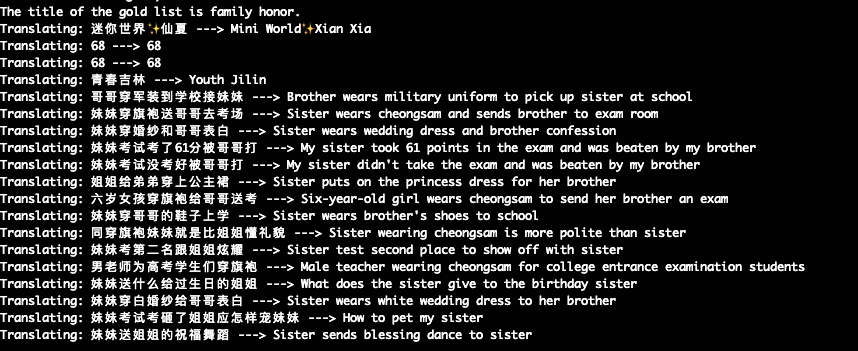
- Translation
Translates the application's UI by hooking 'setText' calls


- Special Credits to @rscloura for his contributions
- Logo Credits: https://www.linkedin.com/in/rafael-c-ferreira
- https://github.com/frida/frida
- https://github.com/dpnishant/appmon
- https://github.com/brompwnie/uitkyk
- https://github.com/shivsahni/APKEnum
- https://github.com/0xdea/frida-scripts
- https://github.com/Areizen/JNI-Frida-Hook