Installing boilerplate templates are different than ordinary templates, you have to follow the steps strictly without skipping any of them.
- Installation
- Databases Setup
- Authentication
- Sanity Integration
- Markdown Integration
- Stripe Integration
- Algolia Integration
- MailChimp Integration
- SMTP Configuration
Before moving to all the other integrations, make sure to install the dependencies.
npm install
When all integrations are done, then you can start the project on the developement server
npm run devIt'll start the template on http://localhost:3000
If you are using a GitHub repo then you can go with free-of-cost and easy-to-use options like Vercel, or Netlify they offer decent-free tiers for Next.js hosting.
Make sure to edit build command like this when deploying to Vercel.
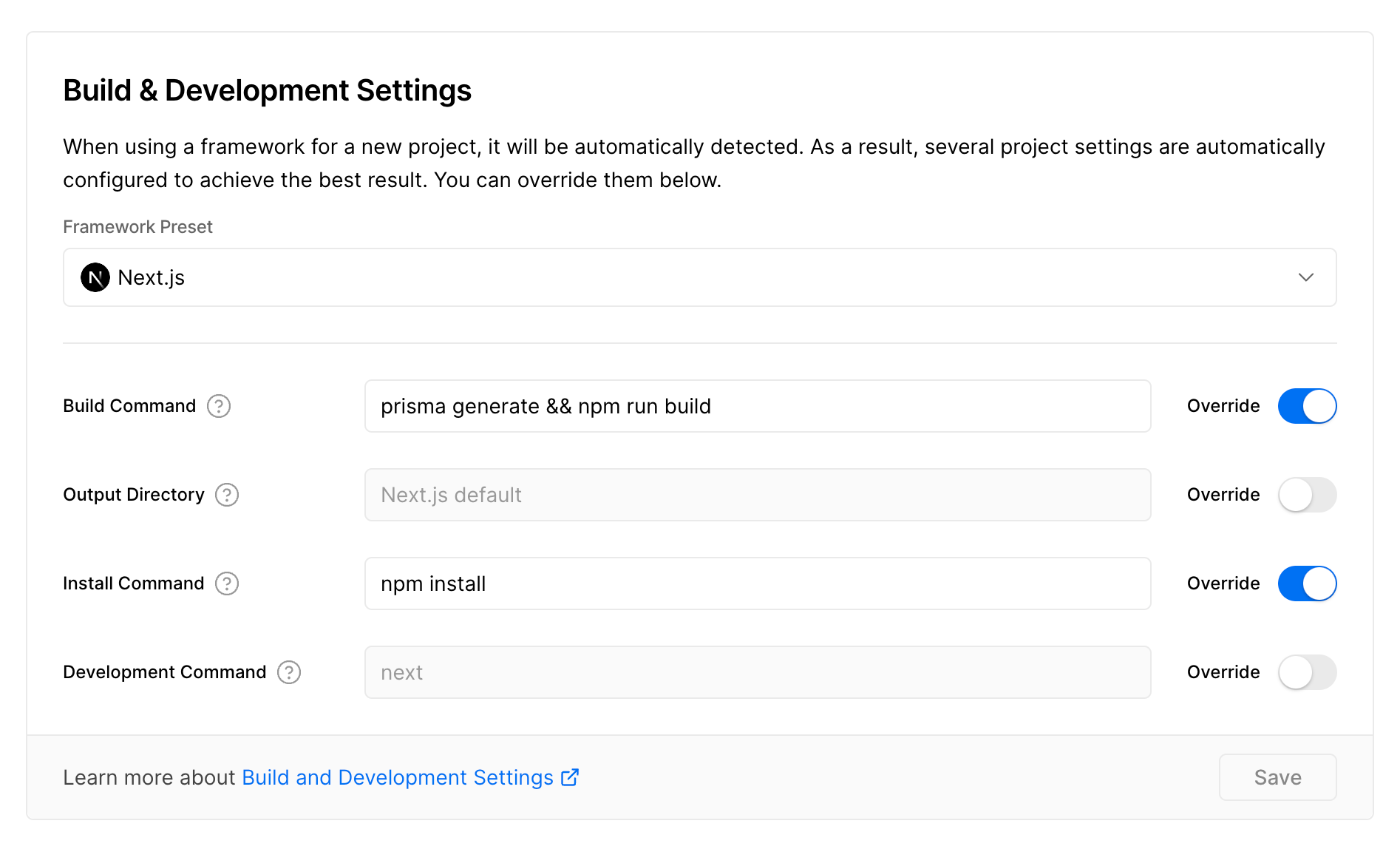
Follow the steps below to complete the installation, if you get stuck feel free to open a support ticket, we will get back to you ASAP.
November 26 2024
- Upgraded to Next.js v15
November 13 2024
- Updated Sanity Integrations
- Integrated Zod for Form validation
- Added Stripe webhook
- Added integrations enable disable features
To enable email functionality for the contact form:
- Create a
.env.localfile in the root directory (if it doesn't exist already) - Add the following environment variables to the file:
EMAIL_SERVER_HOST="smtp.your-email-provider.com"
EMAIL_SERVER_PORT=587
EMAIL_SERVER_USER="your-email-username"
EMAIL_SERVER_PASSWORD="your-email-password"
EMAIL_FROM="[email protected]"
EMAIL_TO="[email protected]"
- Replace the values with your SMTP email service provider details
For Gmail, you could use:
- EMAIL_SERVER_HOST="smtp.gmail.com"
- EMAIL_SERVER_PORT=587
- EMAIL_SERVER_USER="[email protected]"
- EMAIL_SERVER_PASSWORD="your-app-password" (requires app password, not your regular Google password)
For a service like Resend.com (recommended):
- EMAIL_SERVER_HOST="smtp.resend.com"
- EMAIL_SERVER_PORT=465
- EMAIL_SERVER_USER="resend"
- EMAIL_SERVER_PASSWORD="your-api-key"
- EMAIL_FROM="[email protected]"
After setting these up, restart your development server for the changes to take effect.
Contact form submissions will be sent to [email protected].