
Enterprise-grade Virtual Ethernet VPN Solution
Next-generation security network access technology, providing high-performance Virtual Ethernet tunneling service.

Synchronous Hyper-threaded IO Technology
Full Coroutine + Multithread Architecture
Supports Printable Plain Text Transmission
Full Duplex/Half Duplex Tunnels
VPN Virtual Subnet
Port Mapping to Public Network P-NAT2
Forward Proxy Support
Virtual Firewall
Virtual BGP Multi-line Diversion
Domain Name Query Diversion
Native Support for Soft Routers
PaperAirplane Layering Technology





Dual Network Protocol Stack Support
Broadcast Support (Non-Unicast)
Support for Multiple Tunnel Protocols
MUX Multiplexing
DNS Caching
Dedicated Virtual Memory
CDN Forwarding Support
VPN Turbo
TCP Fast Open
Fixed Window Size Setting
VPN Server Proxy Forwarding
UDP Multi-line Bandwidth Aggregation






Windows
Linux
macOS
Android


- x86 Series
i386 · x86_64 - ARM Series
armv7l · armv7a · aarch64 - Other Architectures
s390x · mipsel · ppc64el · riscv64

Click to view authorized user categories
- 🎓 Academic Researchers
- 💻 Software Engineers
- 🌐 Network Engineers
- 🏢 Enterprise Users
- 🔬 Scientific and Technical Personnel
- 📦 Foreign Trade Users
- 🏛️ Government and Corporate Personnel
- 🎮 Gamers
- 🏬 Group Clients
- 🏣 Public Organizations
- ➰ Communication Technology
- ☁️ IT and Internet Users
- 🔒 Network Security Users
- 📝 Health Content Creators
- 🌍 Users outside Mainland China
⚠️ Usage Restrictions Warning
Use by other users violates the agreement
Unauthorized use will bear legal responsibility


| Behavior Type | Specific Scenario | Legal Basis | Technical Features |
|---|---|---|---|
| Political Security | Subverting the government/splitting | Article 105 of the Criminal Law (Subversion of State Power) | Communication via Tor dark web nodes/encrypted political channels |
| Pornography Crimes | Child pornography/cross-border prostitution | Article 364 of the Criminal Law (Dissemination of Obscene Materials) + US FOSTA Act | Hash value matching/specific payment patterns |
| Gambling Operations | Virtual currency casinos/money laundering | Article 303 of the Criminal Law (Gambling Crime) + Seychelles Gambling Act Article 45 | High-frequency small transfers/fixed odds interfaces |
| Drug Trafficking | Dark web drug markets/poison tutorials | Article 347 of the Criminal Law (Drug Crime) + US Controlled Substances Act §841 | I2P network traffic/Bitcoin mixers |
| Human Trafficking | Trafficking of labor/sexual exploitation | Article 240 of the Criminal Law (Trafficking in Women and Children) + UN Palermo Protocol | Fake recruitment websites/transnational communication groups |
| Financial Crimes | Virtual currency laundering/selling "Four Pieces" | Article 191 of the Criminal Law (Money Laundering) + US Bank Secrecy Act | Dispersed aggregate transactions/Multilevel shell wallets |
| Telecom Fraud | Impersonation of police/legal officers/scams | Article 38 of the Anti-Telecommunications Fraud Law + US FCC 47 CFR §64.1200 | VOIP spoofing/phishing page fingerprints |
| Illegal Transactions | Forgery of KYC/user privacy sale | Article 66 of the Personal Information Protection Law + EU GDPR Article 83 | Database breaches/batch identity authentication requests |
⚖️ Cross-Region Legal Supervision and Accountability Mechanism (Cross-border Judicial Enforcement Framework)
| Jurisdiction | Law Enforcement Body | Core Legal Tools | Sentencing Standards | Cross-national Cooperation Mechanism |
|---|---|---|---|---|
| Mainland China | Public Security Department Cybersecurity Bureau | Article 191 of the Criminal Law (Money Laundering) | - Money Laundering: 10 years imprisonment + 5 times involved amount fine - Harm to State Security: Life imprisonment |
Via Interpol Red Notices for extradition |
| USA | FBI Cyber Crime Division | Computer Fraud and Abuse Act (CFAA 18 U.S.C. §1030) | - Financial Crimes: Up to 20 years imprisonment - Child Pornography: Minimum 25 years mandatory (mandatory sentencing) |
Under the CLOUD Act for cross-border data requests |
| Seychelles | FIU Financial Intelligence Unit | Anti-Money Laundering Law 2020, Article 15 | - Illegal gambling: 5 years imprisonment + $100,000 fine - Data crimes: Daily $10,000 progressive fines |
Commonwealth judicial mutual assistance treaties for automatic enforcement |
| Step | Initiator | Receiver | Action | Legal Basis | Time Limit |
|---|---|---|---|---|---|
| 1 | National Security Authority | FBI | Share crime evidence chain | MLAT judicial assistance agreement | 72 hours |
| 2 | FBI | Seychelles FIU | Issue freezing order for encrypted assets | Anti-Money Laundering Law 2020, Article 15 | Immediate |
| 3 | Seychelles FIU | Cloud Service Provider | Execute data seizure order | Seychelles Criminal Justice Mutual Assistance Law, Article 8 | 72 hours |
| 4 | Cloud Service Provider | Developer | Request judicial assistance (metadata only) | 18 U.S.C. § 2703(f) (Stored Communications Act) | 15 working days |
| 5 | Developer | Interpol | Submit GitHub commit logs | GPL-3.0 Articles 15-17 (No Warrant Clause) | Immediate |
| 6 | Interpol | Cross-border Courts | Submit joint blockchain evidence prosecution | United Nations Convention against Corruption, Article 46 | 30 days |
! Evidence Chain 1: Encrypted Asset Flow Map
+ Submitted to: Seychelles FIU
- Technical Means: Chainalysis on-chain tracing
# Legal Validity: 《Anti-Money Laundering Law 2020》 Annex 3

! Evidence Chain 2: GitHub Development Logs
+ Submitted to: INTERPOL Digital Crime Division
- Technical Verification: GPG signatures + Timestamps
# Legal Validity: The Hague Electronic Evidence Convention-
For Chinese Users:
- Under Article 38 of the Anti-Telecommunications Fraud Law, involved accounts are jointly frozen with family members' bank cards
- Actions harming national security fall under Article 113 of the Criminal Law, possible death penalty
- Illegal cross-border data transmission triggers Article 45 of the Data Security Law, up to 5 million RMB fine + license revocation
-
For US Users:
- The FBI initiates "Unilateral Jurisdiction" (based on USD settlement channels), no extradition needed for direct prosecution
- Child pornography cases invoke 18 U.S.C. §2251, minimum 25-year sentence
- Financial crimes apply the RICO Act, asset confiscation
-
For Seychelles Users:
- Offshore company controllers are personally unlimited liable (Pierce Corporate Veil principle)
- Violations of Article 7 of the Anti-Money Laundering Law 2020 result in $10,000 daily progressive fines
- Dark web transactions under Article 88 of the ICT Law, minimum 10-year sentence without parole
| Jurisdiction | Case Details | Penalty Results | Technical Evidence Methods |
|---|---|---|---|
| Mainland China | Zhao Dong Case (OTC merchant) | Fine ¥23 million + 7 years imprisonment | Chain analysis of mixer funds |
| USA | BitMEX Exchange Case | CEO 30 months imprisonment + $10 million personal fine | Analysis of Kraken exchange API logs |
| Seychelles | OneCoin (VICoin) Ponzi Scheme | Seized 35 offshore accounts + globally wanted principal | SWIFT cross-border payment records analysis |
| Jurisdiction | Case Details | Penalty Results | Evidence Methods |
|---|---|---|---|
| Mainland China | Yabo Sports Platform Case | Recovered ¥3.8 billion + Life imprisonment for main offenders | Alipay merchant transaction analysis |
| USA | Bovada Gambling Platform | Seized $100 million assets + domain suspension | Cloudflare logs matching DDoS attack patterns |
| Seychelles | Bet365 Seychelles Branch | License revoked + fine of $3 million | Server leasing contract tracing |
| Jurisdiction | Case Details | Penalty Results | Evidence Methods |
|---|---|---|---|
| Mainland China | Koala Credit Investigation | CEO 3 years + company ¥50 million fine | Database access logs audit |
| USA | Equifax Data Breach | $700 million compensation + permanent cybersecurity oversight | Exploit traffic analysis |
| Seychelles | Seychelles Data Hub Case | Forced liquidation + executives extradited to US | AWS S3 access logs analysis |
| Case Name | Crime Composition | Punishment Results Across Three Countries |
|---|---|---|
| Galaxy International Case | Gambling + Money Laundering + Cross-border Payments | China: Death sentence with reprieve US: Seized NYC property Seychelles: Deregistered 378 shell companies |
| DarkScandals Case | Child Pornography + Bitcoin Money Laundering + VPN Obfuscation | US: 175 years imprisonment for the first offender China: Seized mining farms Seychelles: Frozen $120M in crypto assets |
/* Validated by cross-jurisdictional judicial practice */
-
Technology Neutral Principle
This tool is a network protocol pure technical implementation (RFC 8446 standard), developers:- Do not operate any servers
- Do not store user traffic logs
- Do not provide commercial support services
-
Illegal Responsibility Separation Mechanism
Loadinggraph LR User_Actions-->ISP[Network Service Provider] Developer-->Code[GitHub Repository] Judicial_Forensics-->ISP Developer-.No_Access.->User_Actions
graph LR
     A[Law Enforcement Request] --> B{Meets Legal Threshold}
     B -->|Yes| C[Provide Limited Materials]
     B -->|No| D[Written Rejection and Filing]
     C --> E[Record Material Delivery]
     D --> F[Judicial Remedy Procedures]
     classDef green fill:#d6f5d6,stroke:#28a745
     classDef red fill:#ffd6cc,stroke:#dc3545
     class C,E green
     class D,F red
| Jurisdiction | Legal Collection Threshold | Provided Materials | Delivery Time Limit | Refusal Basis |
|---|---|---|---|---|
| Mainland China | Provincial Cybersecurity Department "Evidence Retrieval Notice" + "Assistance Investigation Letter" | 1. GitHub commit history metadata 2. Code digital signature certificates 3. Open source license copies |
15 working days | Article 28 of the Cybersecurity Law |
| USA | FISA Court Section 702 directive + DOJ endorsement | 1. PGP-signed files 2. CI/CD build logs 3. Third-party audit reports |
72 hours | Fourth Amendment + DMCA 512(f) |
| Seychelles | Supreme Court Mutual Assistance Order + FIU Anti-Money Laundering Letter | 1. GPL-3.0 notarization 2. Contributor CLA agreement 3. Copyright registration |
30 calendar days | Article 41 of the Electronic Transactions Law |
- No formal judicial documents, only oral/email requests
- Requests for user traffic logs or communication content
- Requests for non-public code design documents
- Cross-border requests without Hague certification
- Compliance Response: Immediately activate the "Judicial Defense Plan" Chapter 7 process
- Judicial Freeze Response
Upon receiving forensic requests, execute immediately:# Freeze GitHub repository to prevent modification gh api repos/liulilittle/openppp2/actions/permissions --method PUT -f enabled=false # Activate legal protection branch git checkout -b legal_lockdown git push origin --force legal_lockdown
+ Step1: Extract judicial document digital signature
+ Step2: Verify with CNNIC/GlobalSign root certificates
- Step3: If verification fails, immediately trigger judicial alert
! Step4: Send violation report to EFF
| Command | Function | Format | Default |
|---|---|---|---|
--rt |
Real-time mode | --rt=[yes|no] |
yes |
--dns |
Set DNS servers | --dns <IP list> |
8.8.8.8,8.8.4.4 |
--tun-flash |
Enable advanced QoS control | --tun-flash=[yes|no] |
no |
--pull-iplist |
Download country IP list | --pull-iplist [file]/[country] |
./ip.txt/CN |
--config |
Configuration file path | --config <file path> |
./appsettings.json |
--mode |
Run mode | --mode=[client|server] |
server |
🔗 IP List Data Source: APNIC Official List
| Command | Function | Format | Default |
|---|---|---|---|
--firewall-rules |
Firewall rules file | --firewall-rules <file> |
./firewall-rules.txt |
| Command | Function | Format | Default |
|---|---|---|---|
--lwip |
Protocol stack selection | --lwip=[yes|no] |
Windows: yesOthers: no |
--vbgp |
Intelligent routing diversion | --vbgp=[yes|no] |
yes |
--nic |
Specify physical network card | --nic <name> |
Auto |
--ngw |
Force gateway address | --ngw <IP> |
Auto |
| Command | Function | Format | Default |
|---|---|---|---|
--tun |
Network card name | --tun <name> |
Platform related |
--tun-ip |
IP address | --tun-ip <IP> |
10.0.0.2 |
--tun-gw |
Gateway address | --tun-gw <IP> |
Platform related |
--tun-mask |
Subnet mask | --tun-mask <bits> |
30 |
--tun-mask |
Preferred network | --tun-host=[yes|no] |
yes |
| Command | Function | Format | Default |
|---|---|---|---|
--tun-mux |
MUX connection count | --tun-mux <connections> |
0 |
--tun-mux-acceleration |
MUX acceleration | --tun-mux-acceleration <mode> |
0 |
--tun-vnet |
Subnet forwarding | --tun-vnet=[yes|no] |
yes |
--tun-ssmt |
Hyper-threading optimization | --tun-ssmt=[thread count]/[mode] |
4/st |
--tun-static |
Static Tunnel | --tun-static=[yes|no] |
no |
--link-restart |
Link reconnection times | --link-restart=[times] |
0 |
--block-quic |
Block QUIC traffic | --block-quic=[yes|no] |
no |
--auto-restart |
Auto-restart program | --auto-restart=[seconds] |
0 |
| Command | Function | Format | Default Value |
|---|---|---|---|
--bypass-iplist |
Bypass list | <file> |
./ip.txt |
--bypass-iplist-nic |
Specify interface for bypass list | <network interface> |
|
--bypass-iplist-ngw |
Specify gateway for bypass list | <IP> |
0.0.0.0 |
--auto-pull-iplist |
Auto-update | [file]/[country] |
Disabled |
--dns-rules |
DNS rules | <file> |
./dns-rules.txt |
| Command | Platform | Function | Format | Default |
|---|---|---|---|---|
--tun-route |
 |
Routing compatibility | --tun-route=[yes|no] |
no |
--tun-protect |
|
Routing protection | --tun-protect=[yes|no] |
yes |
--tun-promisc |
 |
Promiscuous mode | --tun-promisc=[yes|no] |
yes |
| Command | Function | Format |
|---|---|---|
--system-network-reset |
Network reset | --system-network-reset |
--system-network-optimization |
Performance optimization | --system-network-optimization |
--system-network-preferred-ipv4 |
Set IPv4 priority | --system-network-preferred-ipv4 |
--system-network-preferred-ipv6 |
Set IPv6 priority | --system-network-preferred-ipv6 |
--no-lsp |
Disable LSP | --no-lsp |
| Value | Mode | Suitable Scene |
|---|---|---|
| 0 | Standard | General use |
| 1 | Server Acceleration | Download-intensive |
| 2 | Client Acceleration | Upload-intensive |
| 3 | Bi-directional Acceleration | High-performance needs |
| Platform | Default Value |
|---|---|
| Windows | PPP |
| Linux | ppp |
| macOS | utun0 |

| Platform | Default Value | Rules |
|---|---|---|
| Windows | 10.0.0.0 |
(IP & MASK) |
| Linux | 10.0.0.1 |
(IP & MASK) + 1 |
| macOS | 10.0.0.1 |
(IP & MASK) + 1 |
| Mode | Optimization Direction |
|---|---|
| st | Single connection large flow |
| mq | Multi-connection high concurrency |
| Symbol | Description |
|---|---|
[ ] |
Optional parameter |
< > |
Required parameter |
| |
Option separator |
! |
Not available / Disabled |
| Type | Description |
|---|---|
lwip |
Suitable for Windows |
ctcp |
Suitable for !Windows |

Must use a compiler that supports C++17, no other special requirements. Install a C++17 development environment in the standard way.
- Boost >= 1.70 and <= 1.8.6
- jemalloc >= 5.30 (Android excluded)
- OpenSSL >= 1.1.x
- Boost
- jemalloc
- OpenSSL
- cURL
- cURL: https://github.com/curl/curl
- jemalloc: https://github.com/jemalloc/jemalloc
- openssl: https://github.com/openssl/openssl
- Boost: https://www.boost.org/releases/latest
| Platform | Toolchain | Recommended Method | Notes |
|---|---|---|---|
| Windows | Visual Studio 2022 | vcpkg | Use static compilation (/MT, /MTd) |
| Linux | GCC/Clang | Manual compilation | Reference script |
| macOS | LLVM-Clang | Manual compilation | Reference script |
| Android | NDK r20b | Cross-compilation | Reference script |
- Linux: openppp2-ubuntu-3rd-environment
- macOS: openppp2-macos-amd64-environment
- Android: openppp2-android-ndk-r20b-3rd-environment
Must use a compiler supporting C++17, no other special requirements. Install a C++17 development environment in the standard way.
-
Set third-party library paths
ModifyCMakeLists.txtto specify dependency library directories:
SET(THIRD_PARTY_LIBRARY_DIR /your/actual/path) -
Compile and run
# Linux/macOS compilation process
mkdir build && cd build
cmake .. -DCMAKE_BUILD_TYPE=Release
make -j$(nproc)  # Linux automatically detects cores
cd ../bin && ./ppp  # Run the program
ANCIL_FD_BUFFER_STRUCT
Enable sendfd/recvfd shared file descriptor parent fd protection mode
CURLINC_CURL
Access HTTP/HTTPS resources via cURL library
TRANSMISSION_O1
Force network transmission layer to use /O1 optimization
JEMALLOC
Use jemalloc memory allocator instead of default
BUDDY_ALLOC_IMPLEMENTATION
Use buddy allocator for virtual memory management
MUSL
Statically link musl-libc C++ standard library (detached from GNU/Linux libc)
_LARGEFILE64_SOURCE
Ensure musl-libc supports 64-bit file functions
- Download liburing source code and install
- Uncomment the following in
CMakeLists.txt:# IF(PLATFORM_SYSTEM_LINUX) # ADD_DEFINITIONS(-DBOOST_ASIO_HAS_IO_URING=1) # ADD_DEFINITIONS(-DBOOST_ASIO_DISABLE_EPOLL=1) # ENDIF()
- Uncomment the # liburing.a line in TARGET_LINK_LIBRARIES:
TARGET_LINK_LIBRARIES(${NAME}
    libc.a
    libssl.a
    libcrypto.a
    libjemalloc.a
    # liburing.a

    atomic
    dl
    pthread

    libboost_system.a
    libboost_coroutine.a
    libboost_thread.a
    libboost_context.a
    libboost_regex.a
    libboost_filesystem.a)
- Follow the standard Linux build process
| Algorithm Name | Implementation File Path |
|---|---|
simd-aes-128-cfb |
simd_aes_128_cfb.cpp |
simd-aes-256-cfb |
simd_aes_256_cfb.cpp |
simd-aes-128-gcm |
simd_aes_128_gcm.cpp |
simd-aes-256-gcm |
simd_aes_256_gcm.cpp |
Prerequisites
- Only support i386/amd64 platforms
- CPU must support AES-NI instruction set
(PPP automatically detects CPU support via assembly instructions)
Compilation Steps
- Modify
CMakeLists.txt:SET(__SIMD__ TRUE) # Original value FALSE
- Follow standard Linux build process:
mkdir build && cd build
cmake .. -DCMAKE_BUILD_TYPE=Release
make -j $(nproc)
Notes
- Only support i386/amd64; other platforms will fail to compile when enabled
- CPU must support AES-NI instructions (PPP auto-detects)
- Only optimize the following algorithms:
simd-aes-128-cfbsimd-aes-256-cfbsimd-aes-128-gcmsimd-aes-256-gcm
- After modifying
CMakeLists.txt, full recompile:rm -rf build && mkdir build && cd build cmake .. -DCMAKE_BUILD_TYPE=Release make clean && make -j $(nproc)
| Parameter Name | Type | Default Value | Description | Applicable |
|---|---|---|---|---|
| concurrent | int | 1 | Concurrency Thread Number | client|server |
| cdn | array | [80, 443] | List of CDN ports | server |
| Parameter Name | Type | Example Value | Description | Consistency | Applicable |
|---|---|---|---|---|---|
| kf | int | 154543927 | Key generation factor | Mandatory | client|server |
| kx | int | 128 | Interleaving factor | Optional | client|server |
| kl | int | 10 | Minimum NOP bits | Optional | client|server |
| kh | int | 12 | Maximum NOP bits | Optional | client|server |
| sb | int | 1000 | Dynamic sliding window size (bytes) | Optional | client|server |
| protocol | string | aes-128-cfb | Protocol layer encryption algorithm | Mandatory | client|server |
| protocol-key | string | N6HMzdUs7IUnYHwq | Protocol layer encryption key | Mandatory | client|server |
| transport | string | aes-256-cfb | Transport layer encryption algorithm | Mandatory | client|server |
| transport-key | string | HWFweXu2g5RVMEpy | Transport layer encryption key | Mandatory | client|server |
| masked | bool | false | Enable traffic obfuscation | Mandatory | client|server |
| plaintext | bool | false | Allow plaintext transmission | Mandatory | client|server |
| delta-encode | bool | false | Enable delta encoding | Mandatory | client|server |
| shuffle-data | bool | false | Enable data randomization | Mandatory | client|server |
| Parameter Name | Type | Example Value | Description | Applicable |
|---|---|---|---|---|
| public | string | 192.168.0.24 | Public IP Address | server |
| interface | string | 192.168.0.24 | Local Listening Interface IP | server |
| Parameter | Type | Example Value | Description | Applicable | Platform |
|---|---|---|---|---|---|
| size | int | 4096 | Memory pool size (MB) | client|server |
all |
| path | string | "./{}" | Path for memory file storage | client|server |
!windows |
| Parameter Name | Type | Example Value | Description | Applicable |
|---|---|---|---|---|
| inactive.timeout | int | 300 | Idle timeout for the connection (seconds) | client|server |
| connect.timeout | int | 5 | Connection establishment timeout (seconds) | client|server |
| connect.nexcept | int | 4 | Random extension range for connection timeout (seconds) | client|server |
| listen.port | int | 20000 | Listening port | client|server |
| cwnd | int | 0 | Congestion window size (auto-adjusted) | client|server |
| rwnd | int | 0 | Receive window size (auto-adjusted) | client|server |
| turbo | bool | true | Enable TCP acceleration | client|server |
| backlog | int | 511 | Maximum pending connections | client|server |
| fast-open | bool | true | Enable TCP Fast Open | client|server |
| Parameter Name | Type | Example Value | Description | Applicable |
|---|---|---|---|---|
| cwnd | int | 0 | Congestion Window Size | client|server |
| rwnd | int | 0 | Receive Window Size | client|server |
| inactive.timeout | int | 72 | Connection Idle Timeout (seconds) | client|server |
| dns.timeout | int | 4 | DNS Query Timeout (seconds) | client|server |
| dns.ttl | int | 60 | DNS Cache TTL (seconds) | client|server |
| dns.cache | bool | true | Enable DNS Cache | client|server |
| dns.turbo | bool | false | Enable Turbo Mode | client|server |
| dns.redirect | string | "0.0.0.0" | DNS Redirection Address | server |
| listen.port | int | 20000 | Listening Port | server |
| static.keep-alived | array | [1,5] | Keep-Alive Interval [Min, Max] (seconds) | client |
| static.dns | bool | true | Enable Static DNS Service | client |
| static.quic | bool | true | Enable QUIC Support | client |
| static.icmp | bool | true | Enable ICMP Support | client |
| static.aggligator | int | 4 | Bandwidth Aggregator Link Count | client |
| static.servers | array | ["1.0.0.1:20000", ...] | Static Server Address List | client |
| Parameter Name | Type | Example Value | Description | Applicable |
|---|---|---|---|---|
| connect.timeout | int | 20 | Connection Establishment Timeout (seconds) | client|server |
| inactive.timeout | int | 60 | Idle Timeout (seconds) | client|server |
| congestions | int | 134217728 | Max Congestion Control Window (bytes) | client|server |
| keep-alived | array | [1,20] | Keep-Alive Interval [Min, Max] (seconds) | client|server |
| Parameter Name | Type | Example Value | Description | Applicable |
|---|---|---|---|---|
| host | string | starrylink.net | Server Domain Name | server |
| path | string | /tun | WebSocket Path | server |
| listen.ws | int | 20080 | HTTP Listening Port | server |
| listen.wss | int | 20443 | HTTPS Listening Port | server |
| ssl.certificate-file | string | starrylink.net.pem | SSL Certificate File | server |
| ssl.certificate-chain-file | string | starrylink.net.pem | SSL Certificate Chain File | server |
| ssl.certificate-key-file | string | starrylink.net.key | SSL Private Key File | server |
| ssl.certificate-key-password | string | test | SSL Private Key Password | server |
| ssl.ciphersuites | string | TLS_AES_256_GCM_SHA384:... | Cipher Suites List | client|server |
| verify-peer | bool | true | Root Certificate Verification | client |
| http.error | string | Status Code: 404; Not Found | Custom HTTP Error Response Content | server |
| http.request | object | {Cache-Control: "no-cache", ...} | Custom HTTP Request Headers | client |
| http.response | object | {Server: "Kestrel"} | Custom HTTP Response Headers | server |
| Parameter Name | Type | Example Value | Description | Applicable |
|---|---|---|---|---|
| log | string | ./ppp.log | Log File Path | server |
| node | int | 1 | Server Node ID | server |
| subnet | bool | true | Enable Subnet Allocation | server |
| mapping | bool | true | Enable Port Mapping | server |
| backend | string | ws://192.168.0.24/ppp/webhook | Management Backend URL | server |
| backend-key | string | HaEkTB55VcHovKtUPHmU9zn0NjFmC6tff | Management Backend Authentication Key | server |
| Parameter Name | Type | Example Value | Description | Applicable |
|---|---|---|---|---|
| guid | string | {F4569208-BB45-4DEB-B115-0FEA1D91B85B} | Unique Client Identifier | client |
| server | string | ppp://192.168.0.24:20000/ | Server Connection Address | client |
| server-proxy | string | [http|socks]://user:[email protected]:8080/ | Proxy Address for Connecting to Server | client |
| bandwidth | int | 10000 | Bandwidth Limit (Kbp/s) | client |
| reconnections.timeout | int | 5 | Reconnection Wait Time (seconds) | client |
| paper-airplane.tcp | bool | true | Enable Paper Airplane TCP Acceleration | client |
| http-proxy.bind | string | 192.168.0.24 | HTTP Proxy Binding Address | client |
| http-proxy.port | int | 8080 | HTTP Proxy Port | client |
| socks-proxy.bind | string | 192.168.0.24 | SOCKS Proxy Binding Address | client |
| socks-proxy.port | int | 1080 | SOCKS Proxy Port | client |
| socks-proxy.username | string | test | SOCKS Authentication Username | client |
| socks-proxy.password | string | 123456 | SOCKS Authentication Password | client |
| Parameter Name | Type | Example Value | Description | Applicable |
|---|---|---|---|---|
| local-ip | string | 192.168.0.24 | Local IP Address | client |
| local-port | int | 80 | Local Port | client |
| protocol | string | tcp | Protocol Type (tcp/udp) | client |
| remote-ip | string | :: | Remote IP (:: indicates any) | client |
| remote-port | int | 10001 | Remote Port | client |
| Parameter Name | Type | Example Value | Description | Applicable |
|---|---|---|---|---|
| name | string | CMNET | Routing Rule Name | client |
| nic | string | eth1 | Network Interface Name | client |
| ngw | string | 192.168.1.1 | Gateway Address | client |
| path | string | ./cmcc_cidr.txt | Local CIDR File Path | client |
| vbgp | string | https://ispip.clang.cn/cmcc_cidr.txt |
Online CIDR Data Source URL | client |
| Connections | Focus Area |
|---|---|
| 4 | Low latency |
| 8 | Medium latency |
| 12 | High latency |
| 16 | Extreme high latency |
| Thread Count | Focus Area |
|---|---|
| 1 | Single-core optimization |
| CPU cores + 1 | Multi-core optimization |
| Thread Count | Focus Area |
|---|---|
| 1 | Single-core optimization |
| CPU cores | Multi-core optimization |
github.com/liulilittle/dns-rules.txt
Function: Bypass VPN for DNS queries, accelerating local domain resolution

Place the root certificate in the VPN runtime directory: cacert.pem
| Source | Download Link |
|---|---|
| Mirror Repository | github.com/liulilittle/cacert.pem |
| CURL Official | curl.se/docs/caextract.html |
🔒 Certificate purpose: Ensure secure validation for HTTPS access
sudo su
screen -S openppp2
mkdir -p openppp2 && cd openppp2
wget https://github.com/liulilittle/openppp2/releases/latest/download/openppp2-linux-amd64-simd.zip
unzip openppp2-linux-amd64-simd.zip
chmod a+x ppp
rm -rf *.txt *.key *.pem *.zipEdit appsettings.json, clear or remove the server.backend field:
"server": {
    "backend": "",  // Ensure this is empty
    // Other configurations remain unchanged...
    "backend-key": "HaEkTB55VcHovKtUPHmU9zn0NjFmC6tff"
}./ppp1.1 Create Directory
Run PowerShell as Administrator
1.2 Create Directory
mkdir C:\openppp21.3 Download and Cleanup
- Download package to
C:\openppp2:
openppp2-windows-amd64.zip - Unzip and delete redundant files:
cd C:\openppp2
rm cmcc_cidr.txt, crtc_cidr.txt, firewall-rules.txt, ip.txt, starrylink.net.key, starrylink.net.pem, openppp2-windows-amd64.zip
1.4 Client Configuration
Edit the appsettings.json file:
"client": {
    "guid": "{Generate a new GUID}",        // Unique for each client, do not duplicate
    "server": "ppp://192.168.0.24:20000/",  // Connection server address and protocol
    "server-proxy": "",                     // Leave empty (no proxy)
    "bandwidth": 0                          // 0 for unlimited
},
"static": {
    "keep-alived": [              // Keep-alive settings (default)
        1,
        5
    ],
    "dns": true,                  // Enable DNS
    "quic": true,                 // Enable QUIC
    "icmp": true,                 // Enable ICMP
    "aggligator": 0,              // Bandwidth aggregator links (0=disabled)
    "servers": [                  // Clear forwarding server list

    ]
}
1.5 Launch Client
 # Run as Administrator:
.\ppp --mode=client| Protocol Prefix | Transport Mode | Use Case |
|---|---|---|
ppp:// |
Native TCP direct connection | Low latency, high throughput direct connection |
ws:// |
Plain WebSocket transmission | CDN Forwarding |
wss:// |
SSL-encrypted WebSocket | CDN Forwarding |
"server": "ppp://vpn.example.com:20000"   // TCP direct
"server": "ws://vpn.example.com:80"       // WebSocket
"server": "wss://vpn.example.com:443" // Encrypted WebSocket- Must complete all configuration modifications before starting the client
- After configuration changes, restart the client for changes to take effect
| Method | Command/Method |
|---|---|
| PowerShell | [guid]::NewGuid() |
| Online Generator | guidgen.com |
| CMD | powershell -Command "[guid]::NewGuid()" |
- Unit: Kbp/s
0= No limit- Example:
1024= 128 KB/s (~1.0 Mbps)
| Protocol | Port Needed | Firewall Requirements |
|---|---|---|
ppp:// |
TCP 20000 | Allow inbound/outbound connections |
ws:// |
HTTP 80 | Allow HTTP traffic |
wss:// |
HTTPS 443 | Allow SSL traffic |
-
Connection failure
- Check if the server IP/port are correct
- Verify if firewall allows corresponding protocol ports
-
GUID conflicts
- Each device must use a different GUID
- When copying clients, regenerate GUIDs
-
Performance issues
- Prefer
ppp://protocol (best performance) - CDN acceleration
ws://(not recommended)
- Prefer
The value of udp.static.aggligator determines the operating mode:
- > 0: Enable aggregator, must configure
servers(list of aggregator servers) - ≤ 0: Enable static tunnel,
serversis anoptionallist of forwarding servers
"udp": {
    "static": {
        // ...other configurations
        "aggligator": 2,           // Mode selection (>0 to enable aggregator)
        "servers": [               // List of server addresses
            "192.168.1.100:6000",
            "10.0.0.2:6000"
        ]
    }
}-
Separate deployment:
- Install Aggligator server separately
-
Node configuration:
./aggligator --mode=server --flash=yes --congestions=1024 --bind=10000,10001 --host=192.168.0.24:7000
| Parameter | Value | Explanation | Details |
|---|---|---|---|
--mode |
server |
Operation mode | Run as server, receive and forward data |
--flash |
yes |
QoS control | Enable advanced QoS policies |
--congestions |
1024 |
Window size | Max congestion window, 1024 UDP packets - Memory usage ≈ 1024 × MTU(1500 bytes) ≈ 1.5MB - Recommended: 512-2048 per core |
--bind |
10000,10001 |
Listening ports | Local listening ports (comma-separated) - Receive data on these ports - Support load balancing over multiple ports |
--host |
192.168.0.24:7000 |
Forward target | Final forwarding target - Must be UDP service - Format: IP:port or domain:port |
-
Edit
/etc/sysctl.confand add:net.ipv4.ip_forward = 1 net.ipv4.conf.all.forwarding = 1 net.ipv4.conf.default.forwarding = 1 net.ipv6.conf.all.forwarding = 1 net.ipv6.conf.default.forwarding = 1 net.ipv6.conf.lo.forwarding = 1 -
Run
sysctl -pto apply
- Edit
/etc/gai.conf - Add:
precedence ::ffff:0:0/96 100Explanation:
This makes the system prioritize IPv4 addresses for network connections
Ensure Linux routing forwarding is enabled as above.
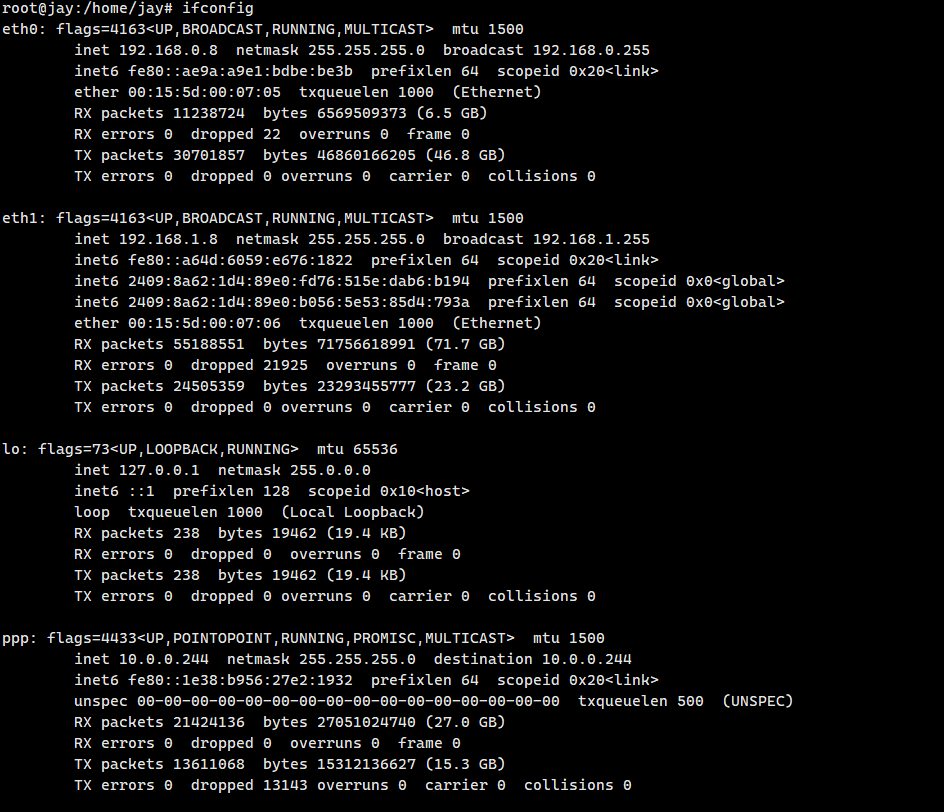
Implement communication between 192.168.1.0/24 and 192.168.0.0/24 subnets:
# Configure bidirectional routing forwarding
iptables -t nat -A POSTROUTING -s 192.168.1.0/24 -j MASQUERADE
iptables -t nat -A POSTROUTING -s 192.168.0.0/24 -j MASQUERADE- Configure separate rules for each subnet:
iptables -t nat -A POSTROUTING -s 192.168.1.0/24 -j MASQUERADE
iptables -t nat -A POSTROUTING -s 192.168.0.0/24 -j MASQUERADE# Merging subnets (/23) causes routing confusion
iptables -t nat -A POSTROUTING -s 192.168.0.0/23 -j MASQUERADEReason:
- Merging subnets (e.g.,
/23) prevents the kernel from correctly recognizing physical NIC egress - Causes source address translation errors, connection failures
- Can disrupt entire network
Each subnet device must set its gateway accordingly:
| Subnet | Gateway Address |
|---|---|
| 192.168.0.0/24 | 192.168.0.8 |
| 192.168.1.0/24 | 192.168.1.8 |
After configuration:
- Devices in
192.168.0.0/24can access192.168.1.0/24and vice versa - Latency is low, data transfer stable
graph LR
    A[Main Router] -->|ASN| C[Internet]
    B[Bypass Router] -->|Forward Traffic| A
    D[Client] -->|Gateway Pointing To| B
| Device Type | IP Address | Subnet Mask | Gateway |
|---|---|---|---|
| Main Router | 192.168.0.1 | 255.255.255.0 | - |
| Bypass Router | 192.168.0.20 | 255.255.255.0 | 192.168.0.1 |
-
🌐 Enable IPv4 Forwarding
Temporary:echo 1 > /proc/sys/net/ipv4/ip_forward
Permanent:
sudo sysctl -w net.ipv4.ip_forward=1
Verify:
sudo sysctl -p
-
🔧 Configure iptables Rules
# Allow outbound traffic from subnet
sudo iptables -A FORWARD -s 192.168.0.0/24 -d 0.0.0.0/0 -j ACCEPT

# Allow established return packets
sudo iptables -A FORWARD -s 0.0.0.0/0 -d 192.168.0.0/24 -m state --state RELATED,ESTABLISHED -j ACCEPT

# Allow ICMP redirect (optional)
sudo iptables -A INPUT -p icmp --icmp-type 30 -j ACCEPT
sudo iptables -A OUTPUT -p icmp --icmp-type 30 -j ACCEPT

# Configure SNAT source address translation
sudo iptables -t nat -A POSTROUTING -s 192.168.0.0/24 -j SNAT --to 192.168.0.20
-
🔍 Client Testing
Change client gateway to192.168.0.20:ping 8.8.8.8 traceroute google.com
❗ Configured but cannot access the internet?
# Check if Docker service interferes
sudo systemctl status docker

# If present, temporarily stop for testing
sudo systemctl stop docker

# After confirming, consider uninstalling or reconfiguring Docker network
sudo apt purge docker.io
| Configuration Item | Function Explanation | Recommended Status |
|---|---|---|
| IP forwarding (net.ipv4.ip_forward) | Enable kernel packet forwarding | =1 |
| FORWARD rules | Control traffic passing through the bypass router | ACCEPT |
| SNAT translation | Replace client source IP with bypass router IP | Necessary |
| Docker Service | May override iptables rules | Disable |
💡 Pro Tip: Make permanent by editing
/etc/sysctl.confand saving iptables withiptables-persistent.
-
Open Registry Editor (
regedit) -
Navigate to:
HKEY_LOCAL_MACHINE\SYSTEM\CurrentControlSet\Services\Tcpip6\Parameters -
Find or create
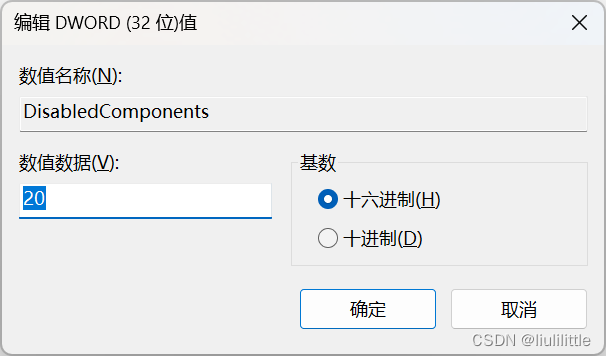
DisabledComponentsDWORD (32-bit) -
Set value data to
0x20(hexadecimal)Value Explanation:
Hex Value Functionality 0x00 Enable IPv6 0x01 Disable IPv4 0x20 Prioritize IPv4 (recommended) 0xFFFFFFFF Fully disable IPv6 -
Click OK and restart
-
Verify:
- Visit test-ipv6.com
- Check IPv6 connectivity status
graph LR
    A[Main Router] -->|ASN| C[Internet]
    B[VGW] -->|Forward Traffic| A
    D[Client] -->|Gateway pointing to| B
Dedicated Software Router Solution - VGW GitHub Release

-
Run PowerShell as Administrator
cd C:/
git clone https://github.com/liulilittle/VGW-release.git vgw
-
Install Network Driver Dependencies (Choose one)
cd C:/vgw/windows/
Option Executable Recommendation Notes 1️⃣ Script Install .\Install_WinPcap.bat⭐⭐ Automatic dependency installation 2️⃣ WinPcap .\WinPcap_4_1_3.exe⭐⭐⭐ Traditional driver 3️⃣ NPCAP .\npcap-1.60.exe⭐⭐⭐⭐ Recommended, supports latest Windows features 💡 It is recommended to install NPCAP for better performance and compatibility
# Execute run.bat or with custom parameters:
.\vgw.exe --ip=192.168.0.40 --ngw=192.168.0.1 --mask=255.255.255.0| Parameter | Function | Example | Required | Notes |
|---|---|---|---|---|
--ip |
Set virtual gateway IP | 192.168.0.40 | ✅ | Must be in LAN subnet and unused |
--ngw |
Main router gateway | 192.168.0.1 | ✅ | Points to main router IP |
--mask |
Subnet mask | 255.255.255.0 | ✅ | Same as main router |
--mac |
Custom virtual MAC | 30:fc:68:88:b4:a9 | ❌ | Defaults to internal MAC |
🔌 Network Type Restriction
Supports only wired networks, WiFi cannot use this mode🖧 IP Configuration Principle
--ipmust be in LAN segment and unused🔄 Admin Rights
All operations require Administrator privileges in PowerShell
Quick response to your inquiries and service requests

Dual Entity Ownership:
| Country | Entity Type | Company Name | Validity |
|---|---|---|---|
| 🇺🇸 USA | LLC | SupersocksR LLC |
2017 ~ 2055 |
| 🇸🇨 Seychelles | Organization (ORG) | SupersocksR ORG |
2017 ~ 2055 |
All rights reserved | 保留所有权利
| Metric | Badge |
|---|---|
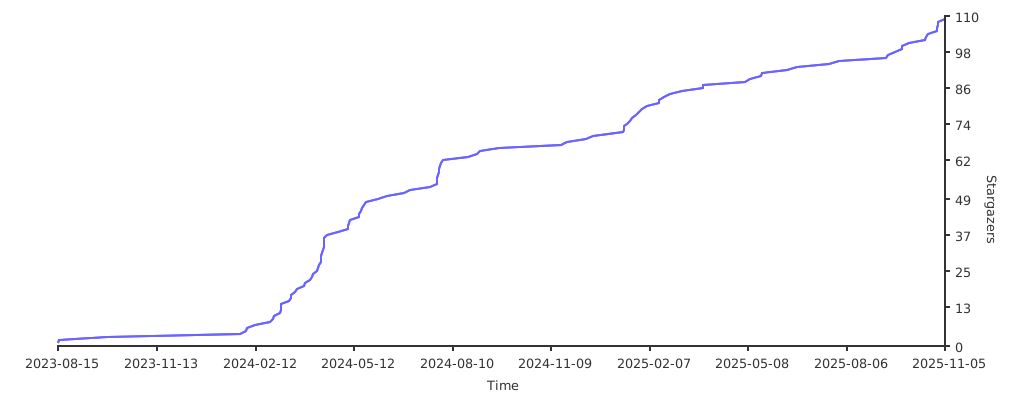
| Stars |  |
| Forks |  |
| Commits |  |

Enterprise-level Secure Network Solution