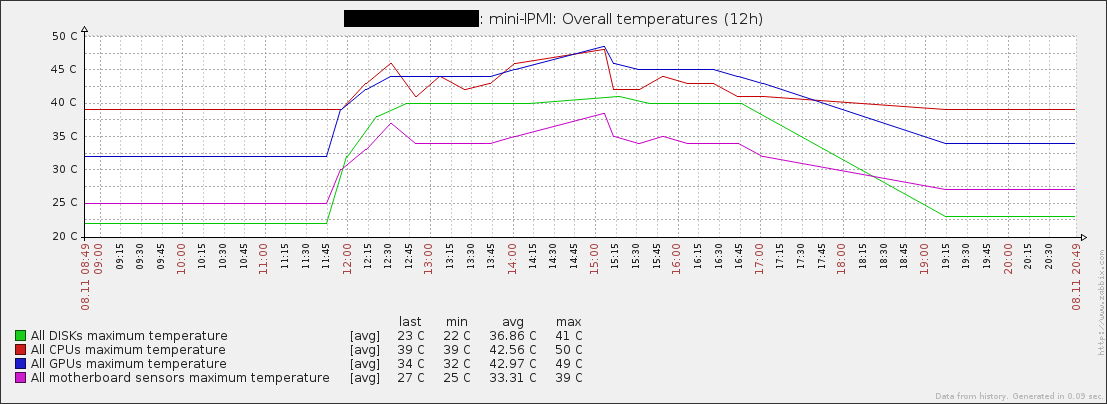
CPU and disk temperature monitoring scripts for zabbix. Also support voltage and fan speed monitoring on certain configurations. Uses lm-sensors, smartmontools and OpenHardwareMonitorReport. For Linux, BSD and Windows.
- Multi-CPU, disk and GPU solution
- Low-Level Discovery
- Bulk item upload with zabbix-sender
- No unnecessary processes are spawned
- Does not spin idle drives
- RAID passthrough (manual)
Only custom param-capable versions are supported on Windows 7+:
Version for Windows XP:
As prerequisites you need python3, lm-sensors, smartmontools, sudo and zabbix-sender packages. For testing zabbix-get is also required.
Take a look at scripts first lines and provide paths if needed. If you have custom RAID configuration, also provide that manually. Import Template_mini-IPMI_v2.xml in zabbix web interface.
client# apt install python3 sudo zabbix-agent zabbix-sender smartmontools lm-sensors
server# apt install zabbix-getclient# yum install python3 sudo zabbix-agent zabbix-sender smartmontools lm_sensors
server# yum install zabbix-getNote: Your include directory may be either
zabbix_agentd.dorzabbix_agentd.conf.ddependent on the distribution.
client# install -o root -g zabbix -m 755 mini_ipmi_smartctl.py Linux/mini_ipmi_lmsensors.py sender_wrapper.py /etc/zabbix/scripts/
client# install -o root -g zabbix -m 644 Linux/zabbix_agentd.d/userparameter_mini-ipmi2.conf /etc/zabbix/zabbix_agentd.d/
client# install -o root -g root -m 600 Linux/sudoers.d/zabbix /etc/sudoers.d/ # place sudoers include for smartctl sudo accessclient# install -o root -g zabbix -m 755 mini_ipmi_smartctl.py BSD/mini_ipmi_bsdcpu.py sender_wrapper.py /etc/zabbix/scripts/
client# install -o root -g zabbix -m 644 BSD/zabbix_agentd.d/userparameter_mini-ipmi2.conf /usr/local/etc/zabbix/zabbix_agentd.d/
client# install -o root -g root -m 600 BSD/sudoers.d/zabbix /usr/local/etc/sudoers.d/Then, for Intel processor you need to add coretemp_load="YES" to /boot/loader.conf. For AMD it will be amdtemp_load="YES". Reboot or manual kldload is required to take effect.
client> move mini_ipmi_smartctl.py "C:\Program Files\Zabbix Agent\scripts\"
client> move mini_ipmi_ohmr.py "C:\Program Files\Zabbix Agent\scripts\"
client> move sender_wrapper.py "C:\Program Files\Zabbix Agent\scripts\"
client> move userparameter_mini-ipmi2.conf "C:\Program Files\Zabbix Agent\zabbix_agentd.d\"
Install python3, adding it to PATH during installation for all users. Install smartmontools and add its bin folder to PATH in environment variables. OpenHardwareMonitorReport 0.8.0.5+ requires .NET Framework 4. 0.3.2.0 requires .NET Framework 3.


Dependent on the distribution, you may need to include your zabbix conf folder in zabbix_agentd.conf, like this:
Include=/usr/local/etc/zabbix/zabbix_agentd.d/
Its recomended to add at least Timeout=10 to server and client config files to allow drives spun up and OHMR execution.
server$ zabbix_get -s client.tld -k mini.cputemp.discovery[get,"Example host"]
server$ zabbix_get -s client.tld -k mini.disktemp.discovery[get,"Example host"]
server$ zabbix_get -s client.tld -k mini.cputemp.discovery[get,"Example host"] --tls-connect psk --tls-psk-identity client.tld --tls-psk-file /home/zabbix/client.tld.psk
server$ zabbix_get -s client.tld -k mini.disktemp.discovery[get,"Example host"] --tls-connect psk --tls-psk-identity client.tld --tls-psk-file /home/zabbix/client.tld.psk
or locally:
client$ /etc/zabbix/scripts/mini_ipmi_lmsensors.py get "Example host"
client$ /etc/zabbix/scripts/mini_ipmi_smartctl.py  get "Example host"
Default operation mode. Displays json that server should get, detaches, then waits and sends data with zabbix-sender. Example host is your Host name field in zabbix. You might want to use nonexistent name for testing to avoid unnecessary database pollution (client introduces itself with this name and false names will be ignored).
server$ zabbix_get -s client.tld -k mini.cputemp.discovery[getverb,"Example host"]
server$ zabbix_get -s client.tld -k mini.disktemp.discovery[getverb,"Example host"]
server$ zabbix_get -s client.tld -k mini.cputemp.discovery[getverb,"Example host"] --tls-connect psk --tls-psk-identity client.tld --tls-psk-file /home/zabbix/client.tld.psk
server$ zabbix_get -s client.tld -k mini.disktemp.discovery[getverb,"Example host"] --tls-connect psk --tls-psk-identity client.tld --tls-psk-file /home/zabbix/client.tld.psk
or locally:
client$ /etc/zabbix/scripts/mini_ipmi_lmsensors.py getverb "Example host"
client_admin!_console> python "C:\Program Files\Zabbix Agent\scripts\mini_ipmi_ohmr.py" getverb "Example host"
Verbose mode. Does not detaches or prints LLD. Lists all items sent to zabbix-sender, also it is possible to see sender output in this mode.
These scripts were tested to work with following configurations:
- Debian 11 / Server (5.0, 6.0) / Agent 4.0 / Python 3.9
- Debian 13 / Server 7.0 / Agent 7.0 / Python 3.13
- Ubuntu 22.04 / Server (5.0, 6.0) / Agent 5.0 / Python 3.10
- Windows Server 2012 / Server 6.0 / Agent 4.0 / Python (3.7, 3.11)
- Windows 10 / Server 6.0 / Agent 4.0 / Python (3.10, 3.11)
- Windows 7 / Server 6.0 / Agent 4.0 / Python (3.4, 3.7, 3.8)
- Centos 7 / Zabbix 3.0 / Python 3.6
- FreeBSD 10.3 / Zabbix 3.0 / Python 3.6
- Windows XP / Zabbix 3.0 / Python 3.4
Overwrite scripts and UserParameters. If UserParameters were changed - agent restart is required. If template had changed from previous version - update it in zabbix web interface marking all Delete missing checkboxes.

Note: low values in php settings
/etc/httpd/conf.d/zabbix.confmay result in request failure. Especiallyphp_value memory_limit.
- Zabbix web panel displays an error on json discovery, but everything works fine (#18)
- Windows version does not detaches, and data will only be gathered on second pass